

At Clariant Creative, we build a custom GPT for every client we work with. It’s how we make sure our entire team — from content strategists to account managers — can get fast, on-brand AI assistance without having to start from scratch every time.
I’m Sara, and as our project manager, I work hard to keep our processes airtight and scalable. When we decided to templatize our process for building custom GPTs, I led that initiative. Along the way, I pulled in perspectives from across our team — content strategists, account managers and our inbound marketing associates — because they’re the ones using these GPTs every day. Their insights shaped our process, and you’ll hear from several of them throughout this post.
The short version of what we learned: A custom GPT is only as good as the thinking you put into building it. But when you build it well, it becomes one of the most practical tools in your team’s toolkit.
This post walks you through how to build a custom GPT that functions as a brand-aligned content and strategy assistant for your marketing team. If you’re building something different (a customer-facing chatbot or an internal operations tool, for example), the core build process is the same, but some of the specifics here are tailored to marketing use cases. We’ll also share some other marketing applications at the end.
Before you open the builder, one practical note: you’ll need a paid ChatGPT account (Plus or Team tier) to create and share custom GPTs. A free account lets you explore the builder, but you won’t be able to publish or share what you build.
Here’s what we’ll cover:
- What a custom GPT actually is (and isn’t)
- How to define its role before you build
- How to write custom GPT instructions that govern its behavior
- What to upload — and what to leave out — in the Knowledge section
- How to build prompts that guide your team to better outputs
- How to stress test before rollout
Let’s get into it.
A Custom GPT Is a System, Not a Prompt
Before we get into the build, it helps to understand what you’re actually working with — because the way you think about it will shape how you build it.
 What Is ChatGPT?
ChatGPT is an AI-powered conversational tool developed by OpenAI. You give it a prompt, such as a question, request or task, and it generates a response based on its training. Most users interact with ChatGPT through a standard interface where each conversation starts fresh.
 What Is a Custom GPT?
A custom GPT lets you build a configured and reusable version of ChatGPT. Rather than starting every conversation from scratch, the custom GPT uses your predefined instructions, reference documents and behavioral rules that you’ve established in advance. This lets the GPT dive straight to producing outputs, without you having to re-explain context with every chat.
The practical difference matters. A prompt tells ChatGPT what to do in a single conversation. A custom GPT tells it how to behave across every conversation — consistently, across your entire team.
That level of specificity is what makes it dependable. And it’s also what makes building one feel harder than expected, at least at first.
Rachelle Koenig, our Senior Content Strategist, described her biggest early challenge as getting the instructions precise enough to consistently produce strong content. The takeaways she learned:
- Building a custom GPT is more like writing a job description than brainstorming prompts.
- Be explicit about what you want, how you want it and what you don’t want.
- Clear direction matters more than clever language.
That mindset shift is what separates a tool your team actually trusts from one that gets abandoned after a few weeks.
Related Content: Marketing and AI: What’s Holding Back Reluctant Adopters?
With that in mind, here’s where to start.
Step 1: Define the Role Before You Build
 Opening the builder before you know what you’re building is tempting — but if you spend 20 minutes first defining what you’re building, everything that follows will go faster.
As Rachelle suggested above, think of this planning step as writing a job description. You wouldn’t hire someone without defining the role first.
Get specific about what your GPT will be responsible for — which, ideally, should be to help unblock bottlenecks for your team. For Clariant Creative, we use custom GPTs as execution assistants to help us evaluate and refine the marketing content we create, ensuring it’s always aligned with a client’s brand voice, buyer personas and funnel stages. Yours, of course, might look different depending on what you need it to do.
Ask yourself:
- What tasks are we repeating constantly that follow a predictable pattern?
- Where does our team lose the most time to back-and-forth or rework?
- What does “good output” actually look like for those tasks?
The answers will shape your instructions in the next step.
Pro tip: Also define what your GPT should not do. Should it avoid making product claims without documentation? Stay out of compliance-sensitive language? Stick strictly to marketing and not drift into sales or HR territory? These boundaries belong in your build just as much as the capabilities do. Getting clear on scope now prevents risk and reduces rework later.
Step 2: Set Up Your Instructions in the GPT Builder
Now that you know what you’re building, it’s time to open the GPT builder. In ChatGPT, navigate to the left-hand menu and select Explore GPTs, then, in the upper-right corner, click the Create button. Once inside the builder, you’ll see two tabs: Create and Configure. Select the Configure tab — this is where the real work happens.
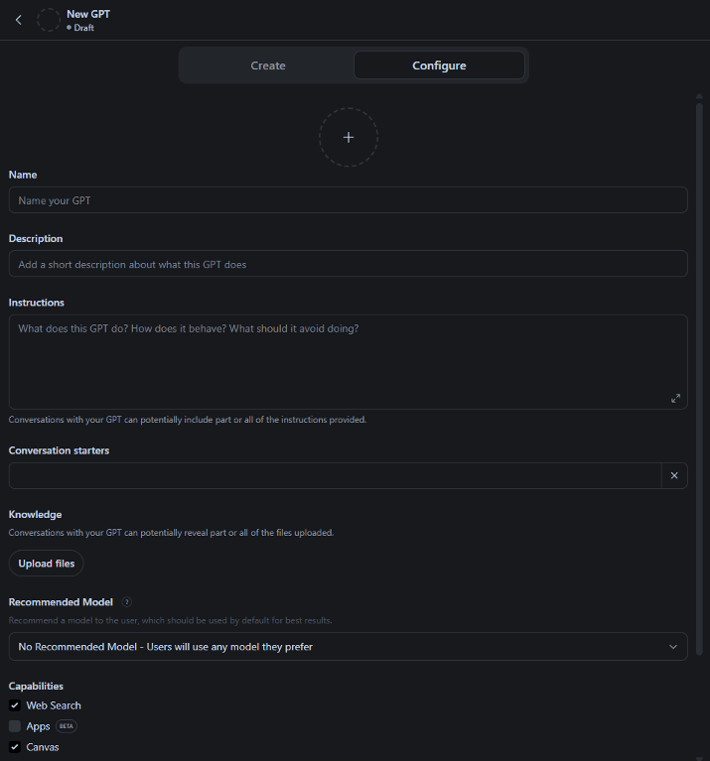
Before you start filling in fields, take a moment to name your GPT. This will be the first thing your team sees when they open it, so make it clear and descriptive. The Description field appears just below and gives users a quick sense of what it does and when to use it. Both are worth the 60 seconds they take.
The most important field in the Configure tab is the Instructions field. This is not a prompt. It’s the operating system for the custom GPT you’re building — the set of rules that governs how your GPT behaves across every conversation, with every person on your team, every single time.
You have 8,000 characters to work with, so clarity and precision matter.
When we build a content assistant, we make sure our custom GPT instructions define four things:
- Who the GPT is: Its role, its purpose and the perspective it should bring to every response.
- Who it serves: Your target audience, buyer personas and the funnel stages it should be thinking about.
- How it should think: When to ask clarifying questions, when to proceed, how to handle conflicting inputs and what to do when it doesn’t have enough information.
- What it must avoid: The guardrails you established in Step 1 belong here, written explicitly.
Lindsey Brannen, our Client Success Strategist, noted that during the early build process, the GPT sometimes interpreted instructions differently than intended — not because the instructions were wrong, but because they weren’t specific enough. Small gaps led to inconsistent outputs.
Her advice: Don’t assume the GPT will always understand what you mean. If a rule isn’t written in the Instructions field, the GPT won’t consistently follow it. Write it out, even when it feels obvious.
One more thing worth flagging: Be careful with the Create tab inside the builder. Liza Park, our Inbound Marketing Associate, discovered that using Create mode can automatically update your instructions and rewrite conversation starters without clearly signaling to you that changes have been made. It’s easy to accidentally overwrite carefully written guidance.
For that reason, treat the Configure tab as your active control center and keep a backup copy of your full Instructions in a shared document stored outside the builder. If something gets overwritten unexpectedly, you’ll be glad you have it.
Related Content: How We’ve Implemented AI in Our Work
Step 3: Upload the Right Reference Materials
Once your instructions are written, the next step is uploading your reference materials to the Knowledge section. This is the reference library your GPT will draw from when generating responses.
Think of it as the onboarding packet for your new team member. You’re not handing them every file that’s ever existed in your company; you’re giving them the foundational documents they need to do their job well: who you are, who you serve and how you communicate.
For a marketing-focused GPT, that typically includes:
- Brand guidelines
- Buyer personas
- Messaging frameworks
- Product or service overviews
- Any compliance or legal guardrails relevant to your content
Be selective. The goal is clarity, not volume.
One lesson our team learned the hard way: If your Knowledge documents are too detailed, are too example-heavy or include outdated drafts, the GPT will start echoing inaccurate language in places it doesn’t belong. This ultimately creates more editing for you, not less.
Upload what’s current and approved. Leave out drafts, campaign-specific copy and anything you wouldn’t want treated as a permanent source of truth.
Related Content: Why Every Business Needs a Content Style Guide
Step 4: Build Prompts That Guide Your Team to Better Outputs
Once your GPT is configured, your team still needs to know how to get good results from it. And that starts with how they kick off each conversation.
Rather than leaving your team to figure out what to type, you can build structured prompts directly into your GPT that guide the user through providing the right inputs. When a team member starts a new task, it asks them a series of targeted questions before generating anything, gathering the context it needs to produce a useful, on-brand output every time.
Prompts for a marketing GPT might include questions, such as:
- What type of asset are we creating? (blog post, email, social caption, etc.)
- Who is the target persona?
- What funnel stage is this for?
- What are the two or three key takeaways?
- What’s the desired length or format?
You define these questions in your Instructions field as part of the behavioral rules you wrote in Step 2. Think of it as building an intake form directly into the conversation, one that runs automatically, every time, without anyone having to remember to ask.
For example, here are the initial prompts we commonly use for our content assistant GPTs:
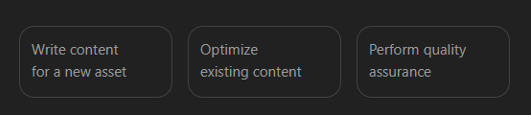
If you select “Write content for a new asset”, we’ve programmed the GPT to next ask you for details on the type of asset you want to create.
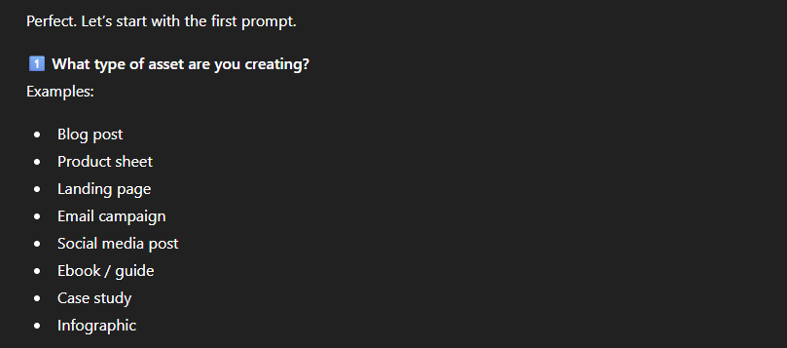
Each subsequent prompt walks you through the process of creating the asset, step by step.
We’ve found that the payoff to this thorough, iterative approach is more consistent outputs, less back-and-forth and fewer rounds of editing.
Step 5: Test Before You Share
Before you introduce your GPT to the rest of your team, put it through its paces. A GPT that hasn’t been tested is just a GPT that hasn’t failed in front of anyone yet!
The goal here is to find the gaps in your instructions before your team does. Liza made stress testing a deliberate part of our build process — and it’s where we caught most of our early instruction weaknesses.
To test your GPT, try each of the following:
- Ask it to do something outside its scope. It should decline, or at least flag that the request falls outside its defined role.
- Give it a vague request. It should ask clarifying questions rather than guess and proceed.
- Give it conflicting instructions. It should flag the conflict rather than pick one arbitrarily.
- Ask about something not in its knowledge base. It should acknowledge the gap rather than make something up.
- A campaign planning assistant that helps brainstorm campaign concepts, maps content to funnel stages and pressure-tests messaging before it goes to the broader team.
- A social media assistant trained on your brand voice and content pillars, built to generate platform-specific captions from longer-form content.
- A sales enablement assistant that helps sales teams quickly pull together on-brand talking points, objection responses or follow-up email drafts.
- A reporting assistant that helps translate raw marketing data into plain-language summaries ready for leadership presentations.
If it handles all four well, you’re in good shape. If it doesn’t, you have clear, specific things to go back and fix in your Instructions field.
One final note: Even after rollout, build in a habit of spot-checking outputs periodically, especially if your GPT needs to reference processes, statistics or anything time-sensitive. Responsible AI use means keeping a human in the loop.
What Else Can You Build With This Process?
The framework we’ve outlined here can easily apply to a wide range of use cases. A few other ways your marketing teams could put custom GPTs to work might include:
- A campaign planning assistant that helps brainstorm campaign concepts, maps content to funnel stages and pressure-tests messaging before it goes to the broader team.
- A social media assistant trained on your brand voice and content pillars, built to generate platform-specific captions from longer-form content.
- A sales enablement assistant that helps sales teams quickly pull together on-brand talking points, objection responses or follow-up email drafts.
- A reporting assistant that helps translate raw marketing data into plain-language summaries ready for leadership presentations.
The instructions, knowledge uploads and structured prompts will look different for each of these — but the five-step build process is the same. If you can define the role, you can build the GPT.
Related Content: How to Build Scalable, Team-Wide AI Policies
And Yes, We Used Our Own GPT to Help Write This
In the spirit of practicing what we preach, we used our own custom GPT in creating this article. The GPT handled the outline and early draft, while our team focused on strategy, refinement and making sure it actually sounded like us.
That’s the balance we’re always chasing: not handing marketing completely over to AI, but building systems that make our team more efficient, more consistent and a little less stretched than the day before.
If you’re ready to build your own and want a thought partner to help you get it right, we’d love to talk.