 ·
6 minute read
·
6 minute read

A website project often looks like a design project, so design is usually where all the attention goes. However, the decisions that protect your budget and timeline get made much earlier in the process, before anyone even opens a design file.
If your team is lean, a website project running off the rails is not something you can easily absorb. That’s why that early window is so important: It’s where you have the most leverage but also the least visibility.
The team I lead at Clariant Creative recently finished two B2B website builds. Both launched on time, both clients were happy, and both projects surfaced some common issues that — if not managed properly — could have quickly tripped up our projects as we headed into the builds. Also, in both cases, the issues had nothing to do with design, and everything to do with how the project was managed from start to finish.
If you’re contemplating a website redesign project at your company, I’ve written this post specifically for you. Let’s walk through these issues together, so you can confidently kick off your project on the right foot.
Where does the risk on a website project typically hide?
As I mentioned above, the design elements of a website project tend to get the most focus. However, in my experience the problems that come up often have nothing to do with aesthetics. Classic examples include:
- Scope creep that eats budget you’ve already committed to other campaigns.
- A rough domain migration that sinks rankings you spent years building.
- A missed launch date that jeopardizes a campaign window you cannot move.
 What these have in common is timing. These issues won’t be obvious when you’re reviewing the slick wireframes and gorgeous graphics your design team has created. Instead, the risks start building the moment you start planning this project.
I know the design phase of a website project can feel like the main event. But I firmly believe the setup phase deserves as much — if not more — of your attention. And I’ve seen many, many clients learn this lesson the hard way.
Scope grows one reasonable step at a time
The first of our two recent projects was scoped as a light content update to a single page on our client’s existing website. Our goals were better visibility, cleaner messaging, and a few conversion improvements. On paper, this looked like a modest job.
And then life happened.
By launch time, this simple update had become a fully rebuilt pillar page, with custom HubSpot modules and multiple conversion points. Every addition along the way made sense on its own. As the copy was being written, we suggested a stronger structure. This, in turn, led to a richer layout for the page. The richer layout justified the custom modules, and so on. Ultimately, the finished deliverable was far more valuable than the original objective. An added bonus is that we can now use the new page layout as a reusable template for other pages on their site, so the value keeps compounding.
This was also a classic case of scope creep.
Fortunately, because everyone on the project communicated early and often, the entire team stayed in alignment and we were able to adjust the timeline and cost estimate as the project expanded. Scope creep turns into a problem only when no one is paying attention.
On website projects, the work often reveals new possibilities, and it’s natural for the scope to expand. What protects you in these instances is discipline: Set clear checkpoints with your team along the way to ensure design, development, budget, and timeline stay aligned even when the project evolves. No one wants to reach the end of the project and suddenly find expectations and reality no longer match.
For a small team, a practical approach is best: When the work grows, that’s your trigger to revisit scope, budget, and timeline on the spot, while there’s still room to decide what’s worth adding and what’s not.
Related Content: HubSpot vs WordPress: Which Is Right for Your B2B Website?
Technical elements are also risk magnets
 The second project I led was a full rebrand: a new company name along with a new visual identity, overhauled core pages, and a website domain change. This was an enormous undertaking! Happily, the finished site looks amazing, and the client is thrilled. However, some of the biggest challenges we faced never appeared in the design comps.
The domain migration is a perfect example. To a nontechnical marketer, changing a domain sounds like flipping a switch. But underneath that sits redirect strategy, SEO equity protection, URL mapping, and content transitions. Handle those well, and no one notices. Handle them poorly, and the organic traffic you’ve been building for years starts to disappear — usually a few months after launch, when it’s harder to connect the drop back to its cause. That traffic is often a large share of the pipeline you’re counting on, which makes a migration a demand-generation event as much as a technical one.
Technical builds — such as interactivity and movement — can also be rife with obstacles without careful management. For example, in this project, late in the build, the client asked to animate a custom illustration with hover effects — after the illustration design had already been finalized. Our developer and designer worked out a clean solution to deliver exactly what the client wanted. It looked terrific, and the dynamic movement was an excellent addition. It also took meaningfully longer to deliver than it would have if the request had been raised earlier in the project. The later a decision lands, the more finished work it disturbs.
There's also another, more invisible cost to consider when adding movement to a website. Every animation, slider, and decorative effect on your site increases page load time. Longer page load time can reduce conversions, increase bounces, and damage your traditional SEO rankings. Motion that doesn’t provide clear value for the visitor works against you, so resist the urge to get swept up in a cool idea until you've assessed whether each moving element actually earns its place.
Ultimately, someone (either you or your agency) must pressure-test the technical implications of every decision before you sign off on the design, not after.
Related Content: 3 Ways to Increase Website Conversions on a Tight Budget
AI is your friend — if you know its limits
At Clariant Creative, we embrace the skillful use of AI tools to level up the work we do for our clients. And yes, we used AI for both of these projects, too. But let’s talk about where these tools help and where they do not.
On the design side, we leaned on AI for troubleshooting: for example, surfacing an export setting worth trying, suggesting an approach outside our usual toolkit, or catching discrepancies. It was less dependable at producing finished visual work.

– Liza Park, Clariant Creative Graphic Designer
On the development side, AI also had a role to play. For that animated illustration I mentioned, our developer used ChatGPT to quickly produce the CSS required to adjust the sizing of the animated image across different screen sizes. This is normally a tedious process, and AI made it significantly easier. But this only worked because she was able to judge the output.

– Laura Swords, Clariant Creative Design & Development Lead
If you’re handing a website project to an agency, assume AI is already part of how they work. The question that matters is whether they can tell when the AI is wrong — because that judgment is what separates “AI that saves time” from “AI that ships mistakes into your build.”
There’s another critical improvement I’ve embraced when structuring my prompts in AI, that I encourage you to adopt when developing your website strategy: Instead of asking your AI tool to confirm a decision you’ve already made, ask it to challenge your approach and name what’s weak or missing. Time and again, I find AI earns its keep as a source of pushback far more than as a source of agreement.
Related Content: How to Build a Custom GPT for Your Marketing Team
How to surface website redesign risks early
The good news is you don’t have to become a web developer to keep your project on track. You do, however, need to force your project risks out into the open early, while key decisions are still cheap and easy to change.
Here are three great questions that will help you do a lot of heavy lifting:
- Before design starts, what could expand the scope, and how will we catch it when it does?
- For any migration or platform change, who owns SEO equity, redirects, and URL mapping, and when does that work begin?
- How does this team use AI, and how will they check its output?
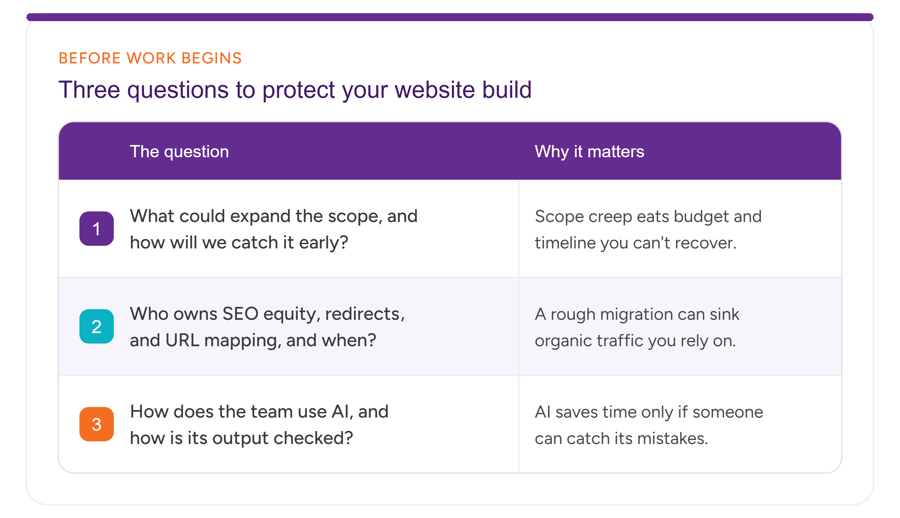 Asking these questions before the design is locked, rather than after, is the whole game.
Set up your website project with intention
Hopefully it’s now clear that your highest-leverage moment in your website build comes at the very beginning. This is when scope, technical risk, and the role of AI either get handled with skill — or lie in hiding, waiting to cause problems later. This moment also happens to be the easiest to skip when you’re busy. And trust me, I know just how busy you are.
This is also the moment you shouldn’t have to manage alone. A good partner will run that gauntlet for you, asking the uncomfortable questions early, flagging issues that are likely to grow, and protecting the traffic and the timeline you’re accountable for – so the challenges stay off your plate instead of taking it over.
If you have a website redesign, new build, or migration project coming up and you’d rather hand it to a team that handles the setup properly, that’s exactly the kind of work we love to take on. We’re ready to talk.